Times Table - Learn Math
- 4.5
- Rating
- 10.00M
- Installs
- Free
- Price
 Analysis by App-foxy
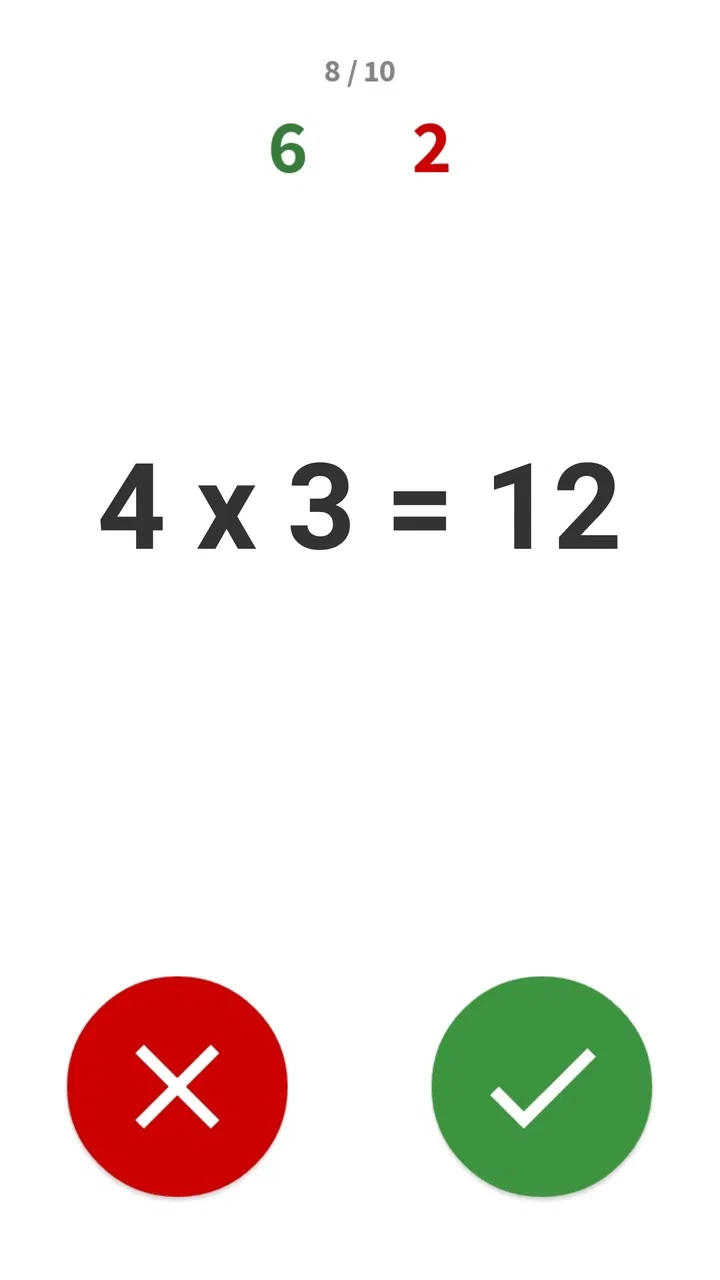
I tried Times Table - Learn Math with a simple question in mind: would it still be useful after the first few playful sessions, or would it become another learning game that gets opened once and forgotten? My impression is that it has a clear purpose and a friendly entry point. It turns multiplication practice into short game-like exercises rather than asking a child to stare at a printed chart. That makes the first week easier to start, especially for learners who resist traditional drills.
This is an educational game from BrainSoft Apps, aimed at practicing multiplication tables in a more active way. It is free to install, rated for Everyone, and available on devices running Android 6.0 or later. The current version is 2.1.8, and the app has reached more than ten million installs with a 4.5 average from roughly 239 thousand ratings. Those figures suggest that it has found a large audience, but they do not replace the more important question: whether its practice style fits the learner in front of you.
What the first week feels like
The strongest part of the experience is the low barrier to starting. A child who already knows a few multiplication facts can quickly understand the basic idea: answer questions, keep moving, and use the game format to make repetition feel less like homework. The store summary describes learning times tables through math games, and that is the right way to understand the app. It is not a complete mathematics course. Its value comes from giving one narrow skill a more approachable place to practice.
You May Also Like

 Blood Strike: 2.5 Anniversary
Blood Strike’s Loadouts Turn Every Drop Into a Tactical Gamble
A close look at Blood Strike’s custom loadouts: how fast access to signature weapons reshapes its battle royale rhythm, rewards preparation, and narrows the gap between fights.

 Pandora - Music & Podcasts
Pandora’s Music Is Easy to Start, but Harder to Recover
Pandora’s strength is its low-effort path from a seed to a station. Its weak spot is how much confidence it asks you to place in connection, setup, and quiet recovery.

 8 Ball Pool
 Is Built on Rivalries, Rematches, and Routine
A close look at the rivalries, rematches, shared routines, and unanswered safety questions that turn a quick pool match into a persistent mobile community.

 Samsung Music
’s Quiet Strength Is Playing What You Already Own
Its reach comes less from spectacle than from dependable access to a personal library. That simplicity is both the app’s strongest retention engine and its ceiling.

 AccuWeather: Weather Radar
AccuWeather Review: A Quick, Clear Forecast for Everyday Decisions
For everyday plans, the best forecast is the one you can understand quickly. AccuWeather makes rain timing, radar, and local conditions easy to act on, with a few trade-offs.

 Hill Climb Racing
Why Hill Climb Racing Still Turns Crashes Into One More Run
A tiny car, a bumpy hill and one more upgrade: Hill Climb Racing keeps resurfacing because its simple chaos makes every near-miss feel personal.
More From Our News Desk



During the first few sessions, the game format can make a noticeable difference to attention. Multiplication is often learned through repetition, but repetition becomes difficult when every question feels identical. Turning that work into a playable activity gives younger learners a reason to continue for another round. I found that especially useful for a short after-school session, when a full worksheet would probably be met with more resistance.
The app is also easy to recommend to families who want something a child can try without committing to a paid download. The free entry point removes much of the risk. There are in-app purchases ranging from $0.99 to $19.99 per item, so I would still check purchase controls before handing over a device, particularly if a child uses a shared phone or tablet. The important distinction is that the app can be tried without paying, while optional spending may still be present.
One practical way to use it in the first week is to keep sessions deliberately short. I would not treat the game as a test of endurance. A child might play after breakfast, during a quiet travel period, or for a few minutes before starting regular homework. The goal is to create repeated contact with multiplication facts while attention is still fresh. If the learner starts guessing quickly just to finish, the session has already gone on too long.
Who benefits most at the beginning
This game makes the most sense for children who are beginning to learn multiplication or who need extra repetition with tables they have already encountered. It can also help a learner who understands the idea of multiplication but hesitates when facts must be recalled quickly. The playful presentation gives that learner more opportunities to respond without making every mistake feel like a formal classroom failure.
It is less suitable as a first explanation of what multiplication means. A child who still needs physical groups, drawings, arrays, or real-world examples may need an adult or teacher to explain the concept separately. The game can support recall, but it should not be expected to replace teaching. I would introduce the meaning of multiplication with objects or examples, then use the app to reinforce the facts afterward.
It is also not the best choice for an older student who needs broader arithmetic practice. Someone working on fractions, algebra, geometry, or multi-step word problems will quickly outgrow this narrow focus. The app earns its place through concentration, not range. That is a strength when the target is times tables and a limitation when the learner needs a complete mathematics platform.
A realistic everyday routine
Imagine a child who is comfortable with the easier tables but regularly pauses on harder combinations. Instead of asking that child to complete a long worksheet every evening, a parent could set aside a brief practice window three or four times during the week. After a game session, the parent could note which facts caused hesitation and review only those facts away from the screen. This creates a useful division of labor: the app supplies repetition, while the adult supplies explanation and context.
That routine is more effective than using the game as a reward with no follow-up. If the child only plays quickly and moves on, the activity may feel enjoyable without improving recall very much. I would occasionally ask the learner to answer a few questions aloud without the app. That simple check shows whether the facts are becoming dependable or whether the child is relying on the visual rhythm of the game.
Whether it keeps its value after the novelty fades
The first-week appeal is clear, but long-term usefulness depends on how the app is fitted into a routine. Multiplication practice is a skill that benefits from returning to it repeatedly, not from one intense burst. In that sense, the game has recurring value because the same basic skill remains relevant while a child moves from learning tables to using them in division, measurement, fractions, and problem solving.
However, the app is unlikely to provide endless variety for every learner. Once a child has mastered the tables, continuing to play the same kind of practice may offer little benefit. This is where parents and teachers need to recognize completion rather than treating continued use as automatically positive. A learning game should not remain on a device simply because it was once helpful.
My preferred month-to-month approach would be to use it as a targeted refresher. It can return to the routine before a school assessment, after a holiday break, or when a child starts making avoidable multiplication errors in other work. That makes more sense than requiring daily use forever. The app is strongest as a dependable practice tool that can be brought back when recall becomes rusty.
There is also a useful distinction between speed and understanding. Game-based questions may encourage faster answers, which can be helpful once the facts are understood. But speed should not become the only measure of progress. A child who answers slowly but accurately may be learning well, while a child who taps rapidly and guesses may appear successful without building reliable knowledge. I would praise accuracy and explain the reasoning behind difficult facts rather than turning every session into a race.
How I would maintain a useful habit
The maintenance burden is fairly low if the app is given a defined role. I would keep it alongside a small amount of offline practice rather than making it the entire learning plan. One session could focus on the game, another on writing or saying facts aloud, and another on applying multiplication to everyday questions such as groups of objects or repeated quantities.
This mixed routine prevents the app from becoming a substitute for memory, language, and reasoning. It also makes progress easier to judge. If a child performs well inside the game but struggles to answer the same fact when asked at the dinner table, that is a sign to slow down and add explanation. If the child can use the facts in a word problem, the digital practice is doing its job.
Parents do not need to supervise every tap, but occasional involvement is worthwhile. I would watch a session early on to see whether the child reads each question carefully, understands mistakes, and knows when to stop. Later, a quick check once in a while is enough. The best habit is one that the learner can manage independently without turning the parent into a full-time scorekeeper.
Because the game is free to start but includes optional purchases, device supervision is part of responsible maintenance. I would review the purchase settings before regular use and make sure the child knows that the learning activity does not require impulsive spending. This is not a reason to reject the app, but it is a practical detail that matters in a family setting.
Where fatigue can appear
The main source of fatigue is repetition itself. Multiplication tables are repetitive by nature, and a game layer can soften that repetition without eliminating it. A learner who enjoys quick challenges may stay engaged longer, while another child may lose interest once the presentation becomes familiar. If the same facts are practiced too often without a new purpose, the app can start to feel like a chore wearing a game costume.
Another possible frustration is a mismatch between the learner’s level and the practice. A child who is still struggling with the meaning of multiplication may feel lost if the activity moves too quickly. A child who has already mastered the tables may feel that the questions are beneath their level. In both cases, the problem is not necessarily poor design; it is that a focused multiplication game has a limited range of usefulness.
Screen fatigue should also be taken seriously. Short sessions are enough for this kind of practice, and there is little educational reason to keep playing for a long stretch. If the child becomes distracted, starts tapping randomly, or asks to switch activities, I would stop rather than push for a larger score. The app works best when it supports concentration, not when it competes with sleep, outdoor play, reading, or conversation.
Some learners may also need more feedback than a game can provide. When a child repeatedly misses a fact, the important question is why. Is the table not memorized, or is the child confusing multiplication with addition, reading too quickly, or losing focus? An adult can diagnose that difference better than a sequence of correct and incorrect answers. I would use mistakes as clues for teaching, not simply as reasons to repeat the same round.
How it compares with familiar alternatives
The usual alternative is a printed multiplication chart or worksheet. Paper is better when a teacher wants to see working, spot patterns, or ask a child to explain an answer. It also avoids screen distractions and does not involve in-app purchases. The game is better when the main obstacle is motivation and the child needs a more inviting way to repeat facts.
Flashcards offer another comparison. They are portable, inexpensive, and excellent for quick oral practice with a parent or sibling. They also make it easy to focus on a small group of troublesome facts. The app has an advantage when the learner wants an individual activity and responds well to interactive presentation. Flashcards remain better for conversation, explanation, and adapting instantly to the child’s mistakes.
A broad mathematics app may be a better long-term choice for a learner who needs addition, subtraction, fractions, geometry, and multiplication in one place. Times Table - Learn Math is more focused. That narrowness is useful when a child needs a dedicated multiplication refresher, but it means families should not mistake it for a complete curriculum.
I would also choose a teacher-led exercise over the app when the child is preparing for a specific classroom difficulty. A teacher can adjust the examples, connect them to current lessons, and explain misconceptions. The game is most valuable between those moments, giving the learner extra practice without requiring an adult to create every question.
What makes it worth keeping installed
The strongest argument for keeping the game is convenience. It gives a child a ready-made way to revisit multiplication without preparing cards or printing worksheets. That matters in ordinary family life, where useful practice often fails because nobody has time to organize it. A short activity that is already available can make the difference between practicing occasionally and not practicing at all.
Its broad audience is reflected in its age rating and large install base, but I would still judge suitability by the individual learner. A young child who enjoys game-like repetition may return to it willingly. A child who dislikes timed-feeling activities, becomes anxious about mistakes, or needs detailed explanations may do better with paper and an adult. The Everyone rating tells me it is broadly accessible, not that every child will enjoy its approach.
The developer, BrainSoft Apps, has kept the product centered on one recognizable learning goal rather than trying to turn it into an oversized education suite. That focus helps the app remain understandable. When I open it, I know what kind of practice I am choosing. The trade-off is that its usefulness is tied closely to the period when multiplication recall is still being built or maintained.
For a family deciding whether to pay for optional items, I would first use the free experience over several sessions and look for actual improvement. If the child is practicing willingly and transferring facts to paper or conversation, an optional purchase might be easier to justify. If the child is only chasing the game and not remembering the mathematics, spending more would not solve the underlying problem.
My long-term verdict
After the novelty fades, Times Table - Learn Math still earns a place for the right learner, but not as a permanent replacement for broader mathematics practice. I see it as a focused training companion: useful when multiplication facts need repetition, convenient when a child needs motivation, and easy to bring back after a break. Its lasting value comes from fitting it into a sensible routine rather than expecting the game itself to carry the whole learning process.
I would recommend it to parents looking for a free starting point, to children who enjoy learning through short game sessions, and to learners who need extra work on multiplication recall. I would skip it as the main tool for conceptual teaching, advanced mathematics, or children who become frustrated by repetitive digital practice. In those situations, a teacher, flashcards, manipulatives, or a broader math app may be the better choice.
My practical recommendation is to try it for a week, keep sessions brief, and then test the same facts away from the screen. If the learner can recall and use them in ordinary homework, the app is providing real value. If the results stay inside the game, change the routine rather than simply playing more. The best reason to keep this app installed is not that it makes multiplication exciting forever, but that it can make regular practice easier to begin and easier to repeat.
FAQs for Times Table - Learn Math
01What age group is Times Table - Learn Math suitable for?
Times Table - Learn Math is designed for children aged 5 to 12, making it suitable for early learners and those in elementary school. It offers varying levels of difficulty that cater to different learning stages, ensuring children can progress at their own pace while mastering multiplication tables.
02Does Times Table - Learn Math require an internet connection?
No, Times Table - Learn Math can be used offline, making it a great tool for learning on the go. Once downloaded, all features are accessible without an internet connection, allowing children to practice multiplication tables anywhere, anytime, without the need for Wi-Fi or data usage.
03Are there in-app purchases in Times Table - Learn Math?
Yes, Times Table - Learn Math offers in-app purchases. While the app provides a variety of free content, additional features and advanced levels can be unlocked through optional purchases. This allows users to enhance their learning experience with more comprehensive tools and exercises.
04How does Times Table - Learn Math make learning engaging?
Times Table - Learn Math uses interactive games, colorful graphics, and fun challenges to engage children. The app includes rewards and progress tracking, which motivate users to improve their skills. This gamified approach ensures that learning multiplication tables is both enjoyable and effective.
05Can parents track their child's progress in Times Table - Learn Math?
Yes, the app includes a progress tracking feature that allows parents to monitor their child's performance. Detailed reports and analytics provide insights into areas where the child excels or may need more practice, helping parents support their child's learning journey effectively.
Pros
- Intuitive interface makes learning fun.
- Adaptive difficulty adjusts to user level.
- Engaging visuals keep kids entertained.
- Includes progress tracking for parents.
- Offline mode available for uninterrupted use.
Cons
- Limited customization for advanced users.
- Ads can be distracting for young learners.
- Requires in-app purchases for full access.
- Audio feedback is sometimes repetitive.
- No multiplayer or competitive features.

Times Table - Learn Math
Gallery